

Set properties for reports and IronCAD Drawings
 Start
Start  Pro
Pro
Description
Set properties about the current document and project . This information can be shown on Para-Flex reports and text fields in the IronCAD 2D Drawings.
Para-Flex Reports can be edited in the Report Editor (available for users of Para-Flex Pro and higher) with some knowledge of underlaying DevExpress framework. Also a ticket can be send to our helpdesk to inform us about the desired changes.
Basics
The dialog Report Properties shows all available property fields. They are devided into two tabs, one with all the document related information, and one with the project related information.
The Apply button saves sends the entered information to Para-Flex to be used within reports. When a 2D Drawing in active, this button also sends the information to the Document Properties of the current ICD file.
Conditions
More information will follow.
IronCAD 2D Drawing Template
The default IronCAD 2D Drawing template already contains links to report properties of Para-Flex. As shown below properties like CreatedBy, ProjectName and OrderNumber are set by default.
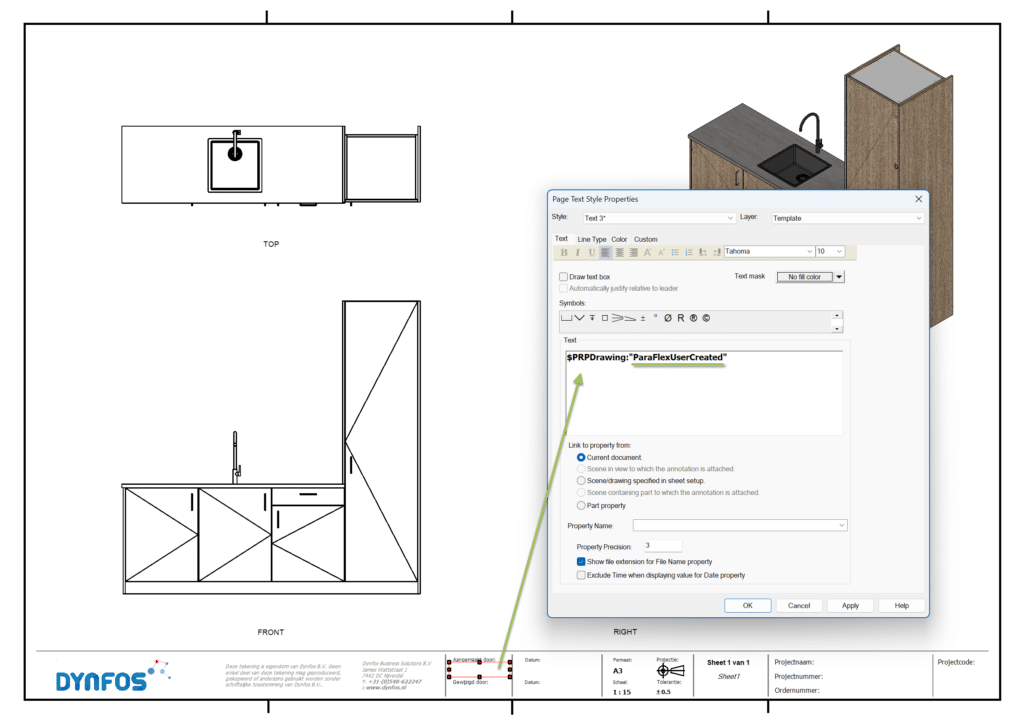
Every property in the section Report Properties can be used.
A text field on a sheet within the IronCAD Drawing file contains a tag refering to a specific property of Para-Flex. As shown they look like $PRPDrawing:”ParaFlex…” with the name of the property on the dots.
More information will follow soon
Tip
Use the default A3 Dynfos PF.icd template as a starting point to create your own drawing template in order to save time.