
Label parts for identification in processing
 Start
Start  Pro
Pro
Description
A tag can be added to Assemblies, to identify parts during further progressing. Products can than be easily be distinguished from each other and grouped on output, like a cutting lists or label printers. This is useful when multiple parts have the same name (for example, “Front”); they can then be linked to the cabinet they belong to.
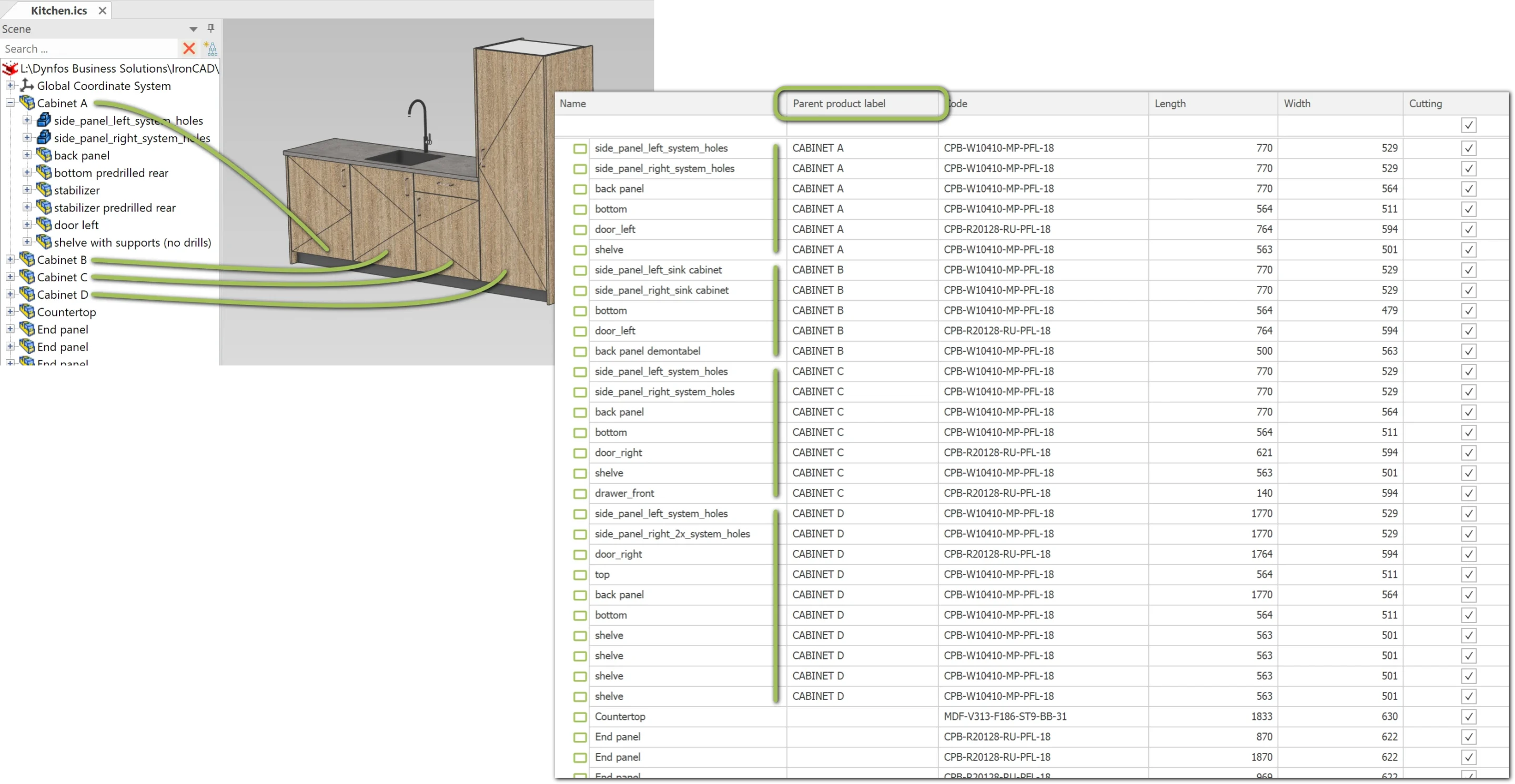
The use of this button switches on or off the labeling on selected Asseblies. The information is stored in the “Parent Product Label” field. This links the name of the selected Assembly to its underlying Parts. The name of the first Assembly for which “Product Label” is enabled (in hierarchical order) takes the lead. It is therefore also possible to use Product Labels for an Assembly that is nested within another Assembly.
The image below shows an example of using Product Label on multiple cabinets.
Conditions
- Only applicable to Assemblies.
Tip
To rename items in IronCAD (for example, in the catalogs and the Scene Browser), first select an item and then click on it again.